Static Sites & CDN Migration
Overview
When migrating our sites from AWS to Azure, the governing constraint was not compute, storage, or even performance, but rather DNS.
Specifically:
- Apex domains (example.com) require an A record
- Traditional A records must point to an IPv4 address
- Many Azure static hosting resource types do not provide a static IP
- Some DNS providers support alias/flattened A records, but generally only for specific internal resource types
These constraints determined which Azure services were viable and which required workarounds, based on the fact that our migration from Route53 to Azure DNS Zones would be a future step after our core applications and websites were migrated. In some cases this led to intermediate architectures before we arrived at a cleaner long-term solution.
This guide covers the three scenarios we encountered, including their shortfalls and the final architecture we arrived at:
- WordPress → Azure Storage (with AWS apex redirect)
- Azure Storage + Front Door (CDN with external DNS constraints)
- Azure Static Web App + Azure DNS Zone (clean apex solution)
Each approach has different DNS implications, operational tradeoffs, and complexity.
DNS Constraints (The Governing Factor)
Before reviewing the scenarios, it’s important to understand what Azure services can and cannot support at the apex level.
DNS Rules That Matter:
www.example.comcan use a CNAMEexample.com(apex/root) must use an A record- Traditional A records require a static IP
- Azure DNS Zones support alias A records to certain Azure resource types
- Not all Azure services support alias records
Service Capability Matrix
| Azure Resource Type | Custom Domain | Apex Domain Support | HTTPS |
|---|---|---|---|
| Azure Web App | ✅ Yes | ✅ IP or alias | ✅ Managed cert |
| Azure Static Web App | ✅ Yes | ⚠️ Azure DNS alias only | ✅ Managed cert |
| Azure Storage (static website) | ⚠️ CNAME only | ❌ No | ❌ Not natively |
| Azure Front Door | ✅ Yes | ⚠️ Azure DNS alias only | ✅ Managed cert |
Key implications:
- Azure Storage static websites do not provide static IPs
- They cannot be used directly for apex A records in Route53
- Azure DNS Zones can alias apex A records to certain Azure services
- Azure Static Web Apps support this model cleanly
These constraints drove the architecture in each migration.
Scenario 1: WordPress → Azure Storage (Sunrize)
Goal
Migrate WordPress content to a static site hosted on Azure Storage to eliminate WordPress maintenance and reduce cost.
We’ll gloss over the details of this as it’s not relevant to the migration strategy, but with LLM coding assistants, many simple websites that were previously hosted on WordPress are actually good candidates for static websites, and the operational complexity of running them or making changes is much lower than managing a WordPress instance.
We elected to use Jekyll for the static site generator, but any static site generator would work.
Architecture Attempted
Internet
    ↓
Route53
    ↓
Azure Storage Static Website
What Worked
- Converted WordPress to Jekyll
- Deployed to Azure Storage static website
www.example.com→ CNAME → storage endpoint- Static hosting worked correctly
- Azure Storage allows providing additional assets used for 404 pages
What Failed
The root domain (example.com) could not be moved.
Why:
- Route53 apex requires an A record
- Azure Storage static websites do not provide a static IP
- They are not valid alias targets in Route53
Result:
www.example.comworked- Apex did not
Workaround Implemented
We kept the existing Azure WordPress instance from a prior migration (hosted as an Azure Web App, with a static IP), downsized it, and turned it into a redirect service:
example.com  → 301 redirect → www.example.com
www.example.com → Azure Storage
This allowed us to complete the migration prior to moving DNS providers.
Evaluated Alternative: S3 Redirect
We evaluated using an S3 bucket for apex redirect. While this works for HTTP, it does not support HTTPS without CloudFront. That reintroduced AWS infrastructure and complexity, so we abandoned it.
Final Architecture
Apex → Azure redirect server
www  → Azure Storage
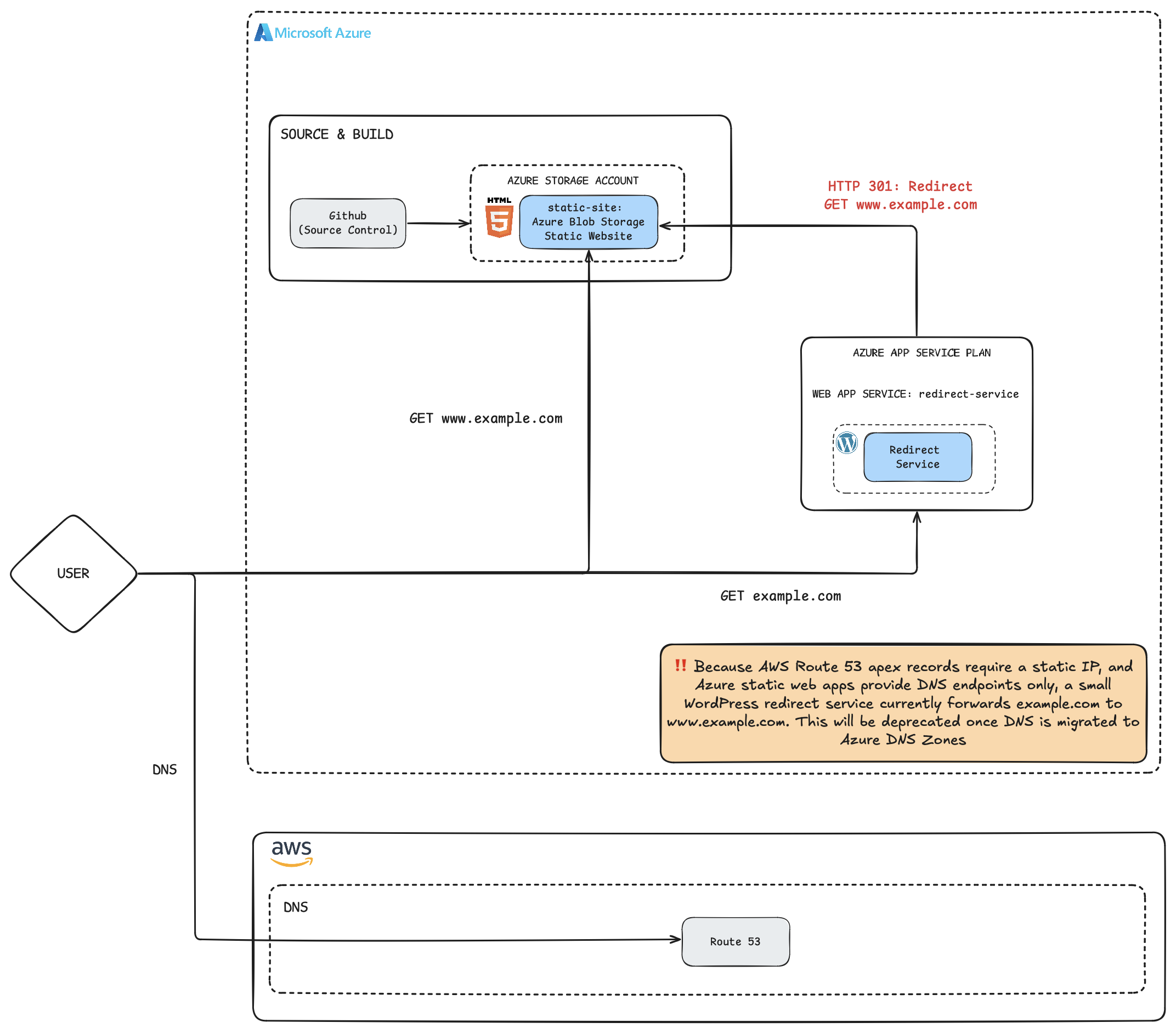
This was funtional, but inelegant, and served as a stop gap until we could move DNS providers.
Deployment
Our static site is developed locally and deployed with a simple Makefile that uses the Azure Storage CLI to upload the new site contents:
deploy:
        az storage blob upload-batch --account-name "<ACCOUNT_NAME>" --destination '$$web' --source _site --overwrite
Scenario 2: Azure Storage + Front Door (CDN Layer)
When DNS is migrated to Azure DNS Zones, there are several options for hosting a static site. The first of those is to continue to use Azure Storage, but to front it with a CDN, which Azure DNS Zones can alias to (even for Apex records).
This scenario can be a natural next step for the one outlined above.
When This Applies
- Uzing Azure DNS Zones
- Need CDN, compression, WAF
- Hosting static content in Azure Storage
Architecture
Internet
    ↓
Azure DNS Zone
    ↓
Azure Front Door
    ↓
Azure Storage Static Website
Azure Front Door provides:
- Global edge distribution
- HTTPS
- Compression
- Security features
DNS Considerations
If DNS remains external:
- www can CNAME to Front Door
- Apex still cannot use traditional A record (no static IP)
If DNS is moved to Azure DNS Zone:
- Azure DNS supports alias A record to Front Door
- Apex becomes viable
Without Azure DNS, an apex workaround is still required.
Real World Example: Migrating an Angular SPA from EC2 to Blob + Front Door
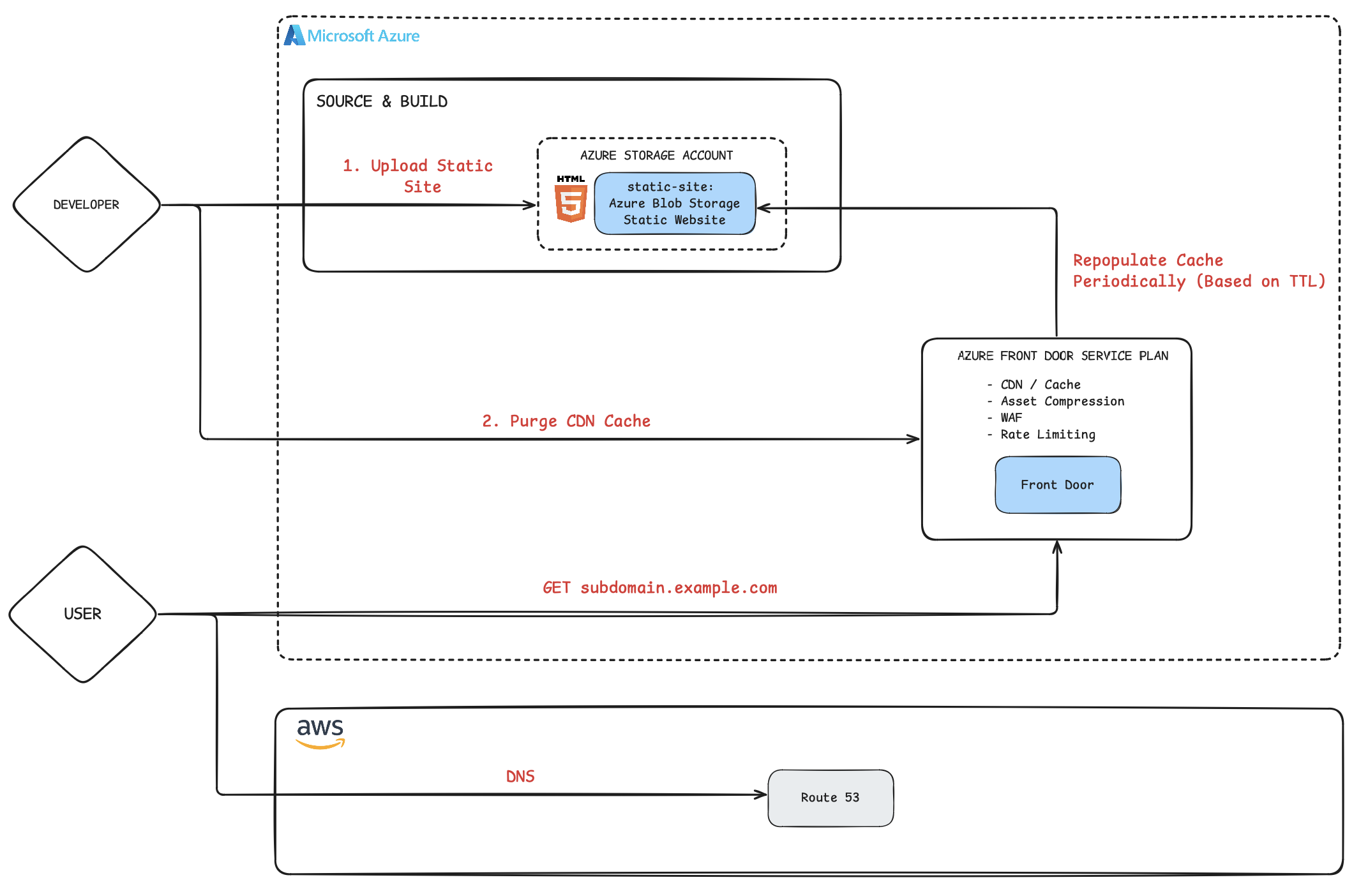
This did, however, serve as a strong solution for one of our static sites served under a subdomain (an Angular-based frontend that had previously been running inside a shared EC2 container alongside other services).
The objective was straightforward:
- Compile Angular assets
- Deploy to Azure Blob Storage
- Serve as a static site
- Place Azure Front Door in front
- Re-route Route53
Architecture
Internet
    ↓
Route53
    ↓
Azure Front Door
    ↓
Azure Storage Static Website
Because DNS was still in Route53 at the time:
- We validated the domain with Front Door via TXT record
- Created a CNAME record to point to Azure Front Door endpoint
- Associated the endpoint with the static storage origin
This mirrored Scenario 2, but in a production setting.
CDN Coordination Matters
Angular builds produce hashed asset filenames:
main.84fd31.js
runtime.aa9221.js
The index.html references these exact filenames.
This introduces an important operational nuance:
If:
- Old assets are deleted from storage
- But CDN cache still serves the previous index.html
Then users may request assets that no longer exist.
There are two ways to handle this:
- Leave historical assets in storage indefinitely
- Clean up old assets and purge the CDN on deployment
Our deployment utility offers three options
- do not purge CDN
- purges Front Door cache async
- purge Front Door cache sync
The purging ensures that each release to ensure the next request for index.html retrieves the updated version that references the new hashed assets.
This coordination between storage cleanup and CDN invalidation is essential for SPA deployments behind a CDN. We share the full deployment script at the bottom of the article.
Why Front Door Was Valuable
Beyond solving HTTPS and DNS integration, Front Door provided:
- Compression of static JS/CSS assets
- Edge caching
- WAF in observation mode
- Basic rate limiting
- TLS enforcement
Even for a fully static site, these features reduced operational overhead while providing enhanced scalability and security.
Scenario 3: Azure Static Web App + Azure DNS Zone
This is the clean architecture we adopted for our other static site, which was not migrated, but a net new creation.
Key Difference
We moved DNS into an Azure DNS Zone.
That unlocked alias A records to Azure services. And using a static Web App allowed us to optionally add Front Door as a CDN, it does not require it.
Archtiecture
Internet
    ↓
Azure DNS Zone
    ↓
Azure Static Web App
Why This Works
- Azure DNS supports alias A record to Static Web App
- Static Web App supports apex domain mapping
- Managed certificates provision automatically
- No static IP required
- Azure Front Door is optional, but not required
- Supports SPA-style routing fallback (so invalid paths can be rerouted to the index page)
This eliminated the need for:
- Redirect servers
- S3 workarounds
- Dual-cloud DNS hacks
Result
example.com → Azure Static Web App (alias A)
www.example.com → CNAME
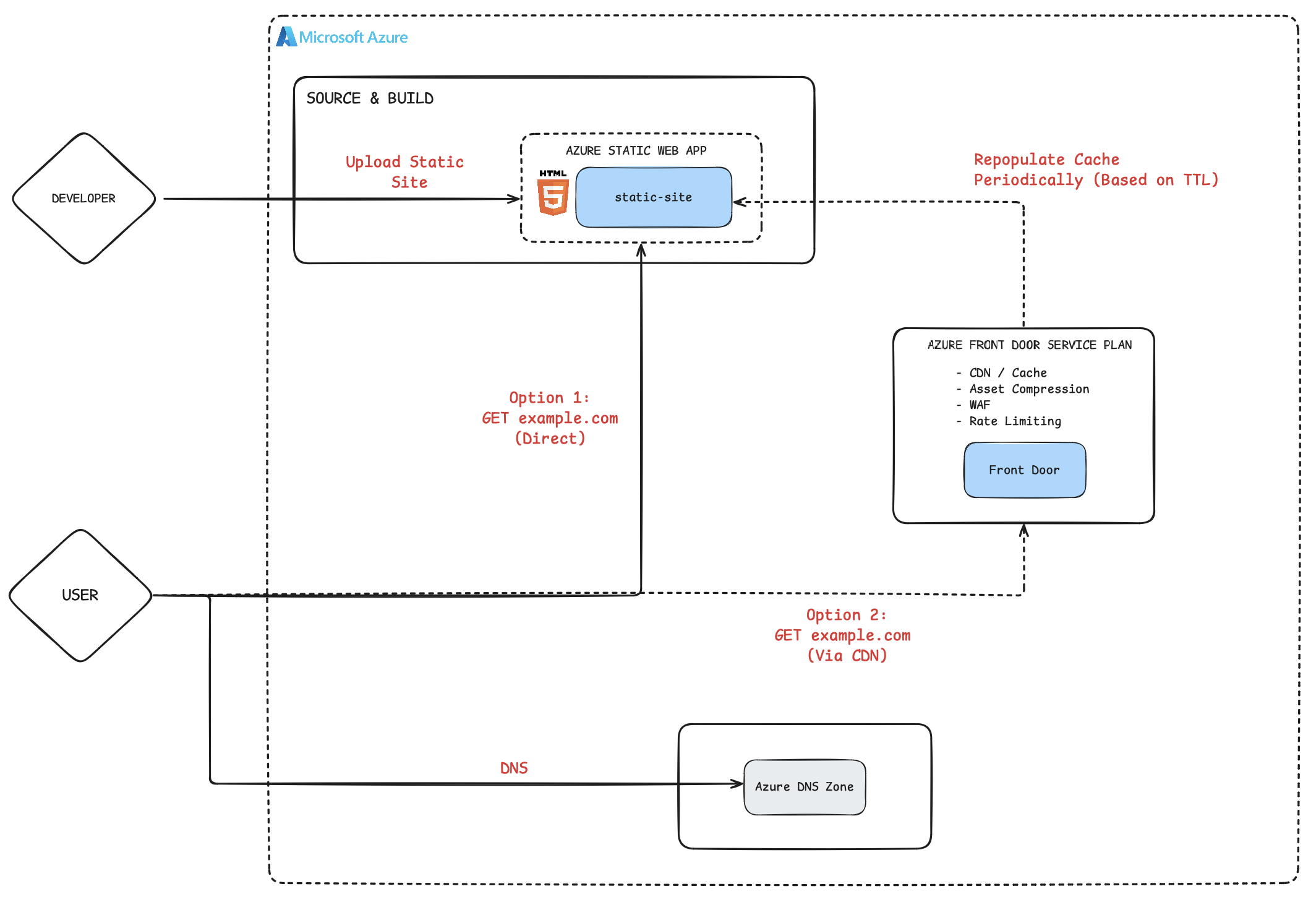
An simple, fully Azure-native solution.
Deployment
As a small company we’re always seeking simple solutions. For deployments we wanted something as straightforward as Azure Storage, and built a small utility using the @azure/static-web-apps-cli package:
.PHONY: deploy setup

setup:
        @if ! command -v swa &> /dev/null; then \
                npm install -g @azure/static-web-apps-cli; \
        else \
                echo "Azure Static Web Apps CLI is already installed"; \
        fi

deploy: setup
        swa login --subscription-id "<SUBSCRIPTION_ID>" \
                  --resource-group "<RESOURCE_GROUP>>" \
                  --app-name "<APP_NAME>"
        swa deploy ./web --env production --app-name "<APP_NAME>" --resource-group "<RESOURCE_GROUP>"
Implementation Details
Azure Storage Static Website
az storage account create \
  --name "sunrizelanding" \
  --resource-group "sunrize-rg" \
  --location "centralus" \
  --sku "Standard_LRS" \
  --kind "StorageV2"
Enable static website in Portal:
- Index:
index.html - Error:
404.html
Deploy:
az storage blob upload-batch \
  --account-name "sunrizelanding" \
  --destination '$web' \
  --source _site \
  --overwrite
Azure Front Door
Create profile and configure origin to:
<storageaccount>.z1.web.core.windows.net
Add custom domain, validate via TXT record, enable managed certificate.
Azure Static Web App
Create:
az staticwebapp create \
  --name "<STATIC_WEB_APP_NAME>" \
  --resource-group "<RESOURCE_GROUP>" \
  --location "centralus"
Add custom domain:
az staticwebapp hostname add \
  --name "<STATIC_WEB_APP_NAME>" \
  --resource-group "<RESOURCE_GROUP>" \
  --hostname "<HOSTNAME>"
When using Azure DNS Zone, this automatically creates:
- Alias A record (apex)
- TXT validation record
Redirect Handling (Static Web App)
Add staticwebapp.config.json:
{
  "navigationFallback": {
    "rewrite": "/index.html",
    "exclude": ["/images/*", "/css/*", "/js/*"]
  }
}
This enables SPA-style routing fallback.
Performance Comparison (WordPress vs Static)
| Platform | Desktop | Mobile |
|---|---|---|
| WordPress (Azure P1V3) | 66 | 33 |
| Static (Azure Storage) | 88 | 56 |
Static hosting reduced cost and improved performance significantly, while significantly reducing operational complexity. The comparison above is for an unoptimized static site versus a WordPress site that utilized many extensions to improve performance.
Lessons Learned
Plan DNS First
DNS constraints determine viable hosting models. Static IP assumptions do not hold in Azure static services.
External DNS Limits Apex Options
If DNS remains in Route53:
- Azure Storage static websites cannot serve apex directly
- Redirect strategies may be required
Azure DNS + Static Web Apps Is Cleanest
- Alias A record support
- Managed certificates
- No static IP requirement
- Minimal operational overhead
CDN Invalidation Must Be Coordinated
For SPAs that generate hashed asset filenames, CDN cache must be purged when cleaning up old assets. Otherwise stale index files may reference deleted resources.
Azure CLI is powerful
- We over-index on simplicity, and the CLI is powerful enough to handle most of our use cases. Simple wrappers in Makefiles and shell scripts allow us to deploy with a single command.
Understanding that upfront simplifies everything that follows. Our new sites were able to use Static Web Apps directly, as they were not constrained by external DNS. Our migrated sites required a more gradual process that dealt with the tradeoffs.
Appendix
Azure Angular deployment script, allowing optional CDN purge syncronously or asynchronously. Note that hardcoded variables are denoted with angle brackets (adjust for your environment)
#!/usr/bin/env python3

import json
import os
import signal
import sys
import subprocess
import argparse
import shutil
from datetime import datetime

###############################################################################
##                                 VARIABLES                                 ##
###############################################################################

AZURE_CONTAINER_NAME = {
    "stage": "$web",
    "prod":  "$web",
}
AZURE_ACCOUNT_SUFFIX =  {
    "stage": "z20.web.core.windows.net",
    "prod":  "z13.web.core.windows.net",
}
STORAGE_ACCOUNT_NAME =  {
    "stage": "<STORAGE_ACCOUNT_NAME_STG>",
    "prod":  "<STORAGE_ACCOUNT_NAME_PROD>",
}
CDN_RESOURCE_GROUP = {
    "stage": "<RESOURCE_GROUP>",
    "prod":  "<RESOURCE_GROUP>",
}
CDN_PROFILE_NAME = {
    "stage": "<CDN_PROFILE_NAME>",
    "prod":  "<CDN_PROFILE_NAME>",
}


###############################################################################
##                             HELPER FUNCTIONS                              ##
###############################################################################

def signal_handler(sig, frame) -> None:
    """ Signal handler for SIGINT (Ctrl+C) """
    print(f"\n{get_timestamp()} Deployment process interrupted. Exiting gracefully...")
    sys.exit(0)

# Register the signal handler for SIGINT
signal.signal(signal.SIGINT, signal_handler)

def get_timestamp() -> str:
    """ Log prefix timestamp in the format: 'YYYY-MM-DD HH:MM:SS' """
    return datetime.now().strftime("%Y-%m-%d %H:%M:%S")

def colorize(text, color) -> str:
    """ Colorize text for terminal output """
    colors = {
        "red":      "\033[91m",
        "green":    "\033[92m",
        "yellow":   "\033[93m",
        "blue":     "\033[94m",
        "purple":   "\033[95m",
        "cyan":     "\033[96m",
        "white":    "\033[97m",
        "reset":    "\033[0m",
    }
    return f"{colors[color]}{text}{colors['reset']}"

def run_command(command, check=True) -> str:
    """ Run a shell command and return the output """
    result = subprocess.run(command, shell=True, capture_output=True, text=True)
    if check and result.returncode != 0:
        print(f"{get_timestamp()} Error: {result.stderr.strip()}")
        sys.exit(result.returncode)
    return result.stdout.strip()

###############################################################################
##                              AZURE FUNCTIONS                              ##
###############################################################################

def check_az_login() -> None:
    """ Check if the user is logged in to Azure CLI """
    try:
        run_command("az account show", check=True)
    except SystemExit:
        print(f"{get_timestamp()} You are not logged in to Azure. Please run 'az login' and try again.")
        sys.exit(1)

def cleanup_old_files(realm) -> None:
    """
        Cleanup old files in Azure Blob Storage.
        LEAD Web will accumulate files over time (as some files have unique names based on the build hash).
        This function will remove all files that were not part of the latest build
    """
    print(f"{get_timestamp()} Cleaning up old files in Azure Blob Storage ({realm})...")
    account_name = STORAGE_ACCOUNT_NAME[realm]
    try:
        # Get list of local files
        local_directory = f"./dist/{realm}"
        local_files = set()
        for root, _, files in os.walk(local_directory):
            for file in files:
                # Collect relative paths as they appear in remote
                relative_path = os.path.relpath(os.path.join(root, file), local_directory)
                local_files.add(relative_path.replace("\\", "/"))  # Ensure uniform path separators

        print(f"{get_timestamp()} Found {len(local_files)} files locally.")

        # Get list of remote files
        list_command = (
            f"az storage blob list "
            f"--account-name {account_name} "
            f"--container-name '{AZURE_CONTAINER_NAME[realm]}' "
            f"--query '[].name' "
            f"--output json"
        )
        remote_files = set(json.loads(run_command(list_command)))

        print(f"{get_timestamp()} Found {len(remote_files)} files in remote storage")

        # Determine files to delete
        files_to_delete = remote_files - local_files
        print(f"{get_timestamp()} Found {len(files_to_delete)} files to delete: {files_to_delete}")

        # Delete the files
        for file in files_to_delete:
            delete_command = (
                f"az storage blob delete "
                f"--account-name {account_name} "
                f"--container-name '{AZURE_CONTAINER_NAME[realm]}' "
                f"--name '{file}' "
            )
            run_command(delete_command)
        print(f"{get_timestamp()} {colorize('Cleanup complete', 'green')} - Removed {len(files_to_delete)} files.")

    except Exception as e:
        print(f"{get_timestamp()} {colorize('Error during cleanup', 'red')}: {str(e)}")
        sys.exit(1)

def purge_cache(realm: str, asyncPurge: bool ) -> None:
    """
        Purge the Azure CDN cache
        Since the other steps clean up old resources, it is important that customers are not pointed to non-existent resources
        This command will take several minutes to run, but can return immediately (and continue asyncronhously) with the --no-wait flag
        For sensitive deploys in which it is essential to receive confirmation of cache purge, do not use the --no-wait flag
        In all other circumstances, asyncPurge set to true will speed the deployment process up
    """
    print(f"{get_timestamp()} Purging Azure CDN cache for realm '{realm}'...")
    try:
        additional_args = " --no-wait true " if asyncPurge else ""
        # Purge the CDN cache
        purge_command = (
            f"az afd endpoint purge "
            f"--resource-group '{CDN_RESOURCE_GROUP[realm]}' "
            f"--profile-name '{CDN_PROFILE_NAME[realm]}' "
            f"--content-paths '/*' "
            f"--endpoint-name '{STORAGE_ACCOUNT_NAME[realm]}' "
            f"{additional_args} "
        )
        run_command(purge_command)
        print(f"{get_timestamp()} {colorize('Cache purge complete', 'green')}")
    except Exception as e:
        print(f"{get_timestamp()} {colorize('Error during cache purge', 'red')}: {str(e)}")
        sys.exit(1)

def deploy(realm: str, cleanup_resources: bool, purge_mode: str) -> None:
    """ Deploy the Angular app to Azure Blob Storage """
    uncommitted_changes = False

    if not realm:
        realm = "stage"
    realm = realm.lower().strip()
    print(f"{get_timestamp()} Starting deployment process for realm '{colorize(realm, 'red')}'...\n")

    # Get git details
    current_branch = run_command("git rev-parse --abbrev-ref HEAD")
    commit_hash = run_command("git rev-parse --short HEAD")
    commit_msg = run_command("git log -1 --pretty=%B")
    print(f"{get_timestamp()} Deploying branch: {current_branch} / commit: {commit_hash} / message: {commit_msg}")

    # Warning unstaged changes: press "Y" to proceed
    if run_command("git status --porcelain"):
        print(f"{get_timestamp()} Warning: There are {colorize('UNSTAGED', 'red')} or {colorize('UNTRACKED', 'red')} changes in the working directory that will be part of the upload.")
        uncommitted_changes = True
        proceed = input("Do you want to proceed with deployment? (Y/N): ")
        if proceed.lower() != "y":
            print(f"{get_timestamp()} Deployment {colorize('aborted', 'red')}.")
            sys.exit(1)

    starttime = datetime.now()

    # Build directory setup
    build_dir = f"./dist/{realm}"
    if os.path.exists(build_dir):
        print(f"{get_timestamp()} Removing old build directory: {build_dir}")
        shutil.rmtree(build_dir)

    # Build the Angular app
    print(f"{get_timestamp()} Building Angular app for realm '{realm}'...")
    build_command = f"./node_modules/@angular/cli/bin/ng build --prod --output-path={build_dir} --configuration={realm}"
    run_command(build_command)

    # Verify the build directory exists
    if not os.path.exists(build_dir):
        print(f"{get_timestamp()} Error: Build directory '{build_dir}' does not exist. Build failed.")
        sys.exit(1)

    # Upload to Azure Blob Storage
    print(f"{get_timestamp()} Uploading files to Azure Blob Storage ({realm})...")
    upload_command = (
        f"az storage blob upload-batch "
        f"--account-name {STORAGE_ACCOUNT_NAME[realm]} "
        f"--source {build_dir} "
        f"--destination '{AZURE_CONTAINER_NAME[realm]}' "
        f"--overwrite "
    )
    run_command(upload_command)

    git_hash = f"{commit_hash}" + f"-{realm}" + f"-{datetime.now().strftime('%Y%m%d%H%M%S')}"
    if uncommitted_changes:
        git_hash += "-ALTERED"
    print(f"{get_timestamp()} Tagging deployment with commit hash: {git_hash}")

    # Tag the deployment with the commit hash
    upload_command = (
        f"az storage blob metadata update "
        f"--account-name {STORAGE_ACCOUNT_NAME[realm]} "
        f"--container-name '$web' "
        f"--name 'index.html' "
        f"--metadata version='{git_hash}' "
    )
    run_command(upload_command)

    if cleanup_resources:
        cleanup_old_files(realm)

    end_deploy_time = datetime.now()

    # Invalidate the CDN so it points to the new resources rather than the old resources (which we've deleted)
    if purge_mode == "sync" or purge_mode == "async":
        purge_cache(realm, asyncPurge=(purge_mode == "async"))

    print(f"{get_timestamp()} {colorize('Deployment complete', 'green')} (deploy time taken: {end_deploy_time - starttime})\n")
    print(f"Direct access at: https://{STORAGE_ACCOUNT_NAME[realm]}.{AZURE_ACCOUNT_SUFFIX[realm]}/index.html\n")

if __name__ == "__main__":
    parser = argparse.ArgumentParser(description="Deploy Angular app to Azure Blob Storage.")
    parser.add_argument("--realm", required=False, help="Deployment realm ('stage', 'prod'). Default: 'stage'.")
    parser.add_argument("--cleanup-resources", required=False, help="Cleanup old resources from previous deploy after current deployment succeeds", default=True)

    cdn_group = parser.add_mutually_exclusive_group()
    cdn_group.add_argument("--no-cdn-purge", action="store_true", help="Do not purge CDN (default).")
    cdn_group.add_argument("--purge-cdn-sync", action="store_true", help="Purge CDN synchronously (will be slow).")
    cdn_group.add_argument("--purge-cdn-async", action="store_true", help="Purge CDN asynchronously (returns immediately).")

    args = parser.parse_args()

    if args.purge_cdn_sync:
        purge_mode = "sync"
    elif args.purge_cdn_async:
        purge_mode = "async"
    else:
        purge_mode = "no-purge"  # Default

    # Check Azure CLI login
    check_az_login()

    # Deploy the app
    deploy(realm=args.realm, cleanup_resources=args.cleanup_resources, purge_mode=purge_mode)
Enjoying this migration guide?
Get notified when new chapters are published. No spam, unsubscribe anytime.