Chapter 2: From Amazon ECS to Azure App Service — A Real-World Container Migration
Preface: Evaluating Azure App Service
Before diving into the migration steps, it’s worth addressing a conceptual trap that shapes everything that follows.
If you’re coming from AWS, your mental model for container hosting is either ECS (managed orchestration) or EC2 (a VM you control). Azure App Service doesn’t map cleanly to either. It’s a different abstraction.
The clearest way to think about it:
App Service is a managed application runtime, not a managed VM
You don’t see the underlying OS. You don’t patch it. You don’t configure the network interface directly. Microsoft manages the host, the hypervisor, the OS updates, and the runtime plumbing. You bring a container image (or code), configure environment variables, and App Service handles the rest.
It’s also not a container orchestrator in the way ECS is. App Service supports horizontal scaling, but it does not expose container orchestration as a first-class concern the way ECS does. ECS gives you task definitions, service scaling policies, and explicit networking topology as part of its control surface. App Service deliberately hides that layer. There is no cluster to manage, no task scheduler to tune, and no container-level placement rules. Scaling operates at the application instance level, and the orchestration layer is fully abstracted away. It is designed to run an application reliably — not to orchestrate a fleet of containers.
Compared with ECS, this model is simpler and easier to use. Compared with EC2, migrating to App Service poses a meaningful operational win — our compliance burden dropped noticeably because we could lean on Microsoft’s existing security certifications rather than defending our own patching cadence.
But it comes with a tradeoff when compared to EC2 hosts: the resource model is not equivalent to a same-spec EC2 instance.
On EC2, a 1 vCPU / 2 GB instance gives you a dedicated CPU core and a fixed network interface with a static IP and predictable NAT throughput. On App Service, you’re running in a multi-tenant environment on shared infrastructure. Your vCPU and memory allocations are real, but the surrounding resources — outbound NAT bandwidth, network throughput, I/O — are shared and subject to platform-level limits that don’t map 1:1 to AWS.
In our case, moving from EC2 to App Service required some application optimizations. More on that shortly.
Our Apps, and the Constraints We Had to Build Around
Our platform spans quite a few services, running NodeJS, Java and Python . Each of our applications had different operational requirements. The following are a few that we needed to build around:
Singleton constraint. Several services run background jobs on a schedule. Two instances running simultaneously means duplicate job executions. Any migration path had to preserve single-instance semantics, both during and after the migration.
Zero-downtime deploys. Container restarts during a deploy create a brief but real window of failed requests. For production services with live users, that’s not acceptable.
Genuine environment parity. We needed a real staging environment, not just a copy of prod with a different domain.
Service decomposition. Some services needed to be split apart during the migration — not just lifted and shifted — because different parts of the same app had meaningfully different runtime and dependency requirements.
The Target Architecture
The following the common architecture pattern we applied across the platform (with some minor varitions for specific services):
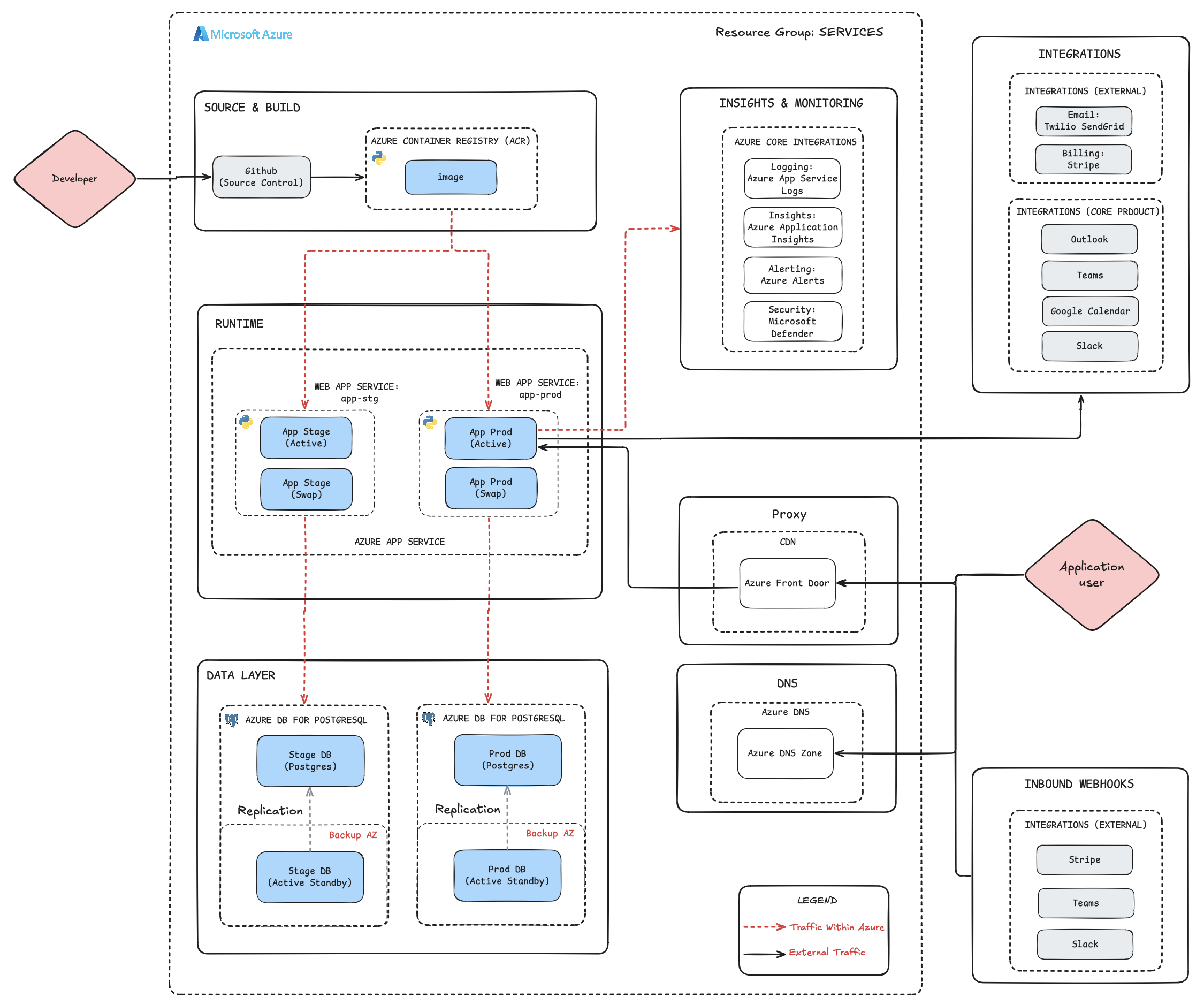
Figure 2.1: Post-migration architecture. GitHub → ACR → App Service, with Active/Swap deployment slots for both staging and production environments. Monitoring via Application Insights, Azure Alerts, Microsoft Defender, and Rollbar.
Key components:
- Azure Container Registry (ACR) — the equivalent of ECR, stores the Docker images.
- Azure App Service Plan — hosts Web App Services for each workload. Production services each have an Active and Swap deployment slot, enabling zero-downtime deploys.
- Azure DB for PostgreSQL — the equivalent of RDS, backing both environments, with a production active-standby replica in a separate availability zone.
- Insights & Monitoring — Application Insights, App Service Logs, Azure Alerts and Microsoft Defender
- External integrations — Twilio SendGrid, Stripe, Slack, etc
The deliberate separation of staging and production as independent Web App Services — each with their own slot pair — is what gives us genuine environment fidelity, rather than just a renamed copy.
The Migration, Step by Step
First we configure the Azure Container Registry (ACR) to push our images to. Below we’ll use one of our Python apps for illustration, but the overall workflow for Java and NodeJS is nearly identical.
Step 1: Build the Container Image
We kept our existing “build locally, push image” workflow rather than switching to Azure’s native build pipeline. This was intentional. Our philosophy was to migrate first, and then optimize further.
# Standard x86 build
docker build -t gunicorn-app:latest -f docker/Dockerfile .
If you’re building on Apple Silicon (M1/M2/M3), you must explicitly target x86, since ACR defaults to linux/amd64:
docker buildx build --platform=linux/amd64 -t gunicorn-app:latest -f docker/Dockerfile .
Verify the architecture before pushing:
docker run -p 80:80 --platform=linux/amd64 -it gunicorn-app:latest
docker inspect gunicorn-app:latest | grep Architecture
Step 2: Set Up Azure Container Registry
ACR replaces ECR as the image repository:
$ az acr create --resource-group "app-core-services" --name "app" --sku Basic

$ az acr login --name app

$ docker tag gunicorn-app:latest app.azurecr.io/gunicorn-app:latest

$ docker push app.azurecr.io/gunicorn-app:latest
Verify the upload by comparing SHA digests — a corrupted layer push is rare but produces miserable debugging:
docker images --digests
Step 3: Create the App Service
In the Azure Portal, create a new Web App configured as a Linux Container. Point it at the ACR image and tag.
For instance type of this particular application, we chose Basic B1 — which actually exceeds our old Fargate allocation of 0.25 vCPU / 512 MB.
Use the migration as an opportunity to right-size rather than just copy. That said: Deployment Slots require a Premium tier plan. If you start on Basic, you’ll need to scale up before slots are available. Plan for this upfront — it requires a redeployment.
Step 4: Enable Logging
Two layers to configure:
File system logging is the quick win: App Service → Monitoring → App Service Logs → Enable File System Logging. This gives you the live Log Stream in the Portal, but has very limited retention.
Application Insights is where you want to land for production. Enable it in the App Service configuration, then in Diagnostic Settings, enable at minimum:
- App Service application logs
- HTTP access logs
- Security audit logs
Once enabled, you can query logs with KQL:
AppServiceAppLogs
Application Insights also gives you distributed tracing, performance baselines, availability tests, and anomaly alerts — things that required significant CloudWatch configuration to approximate on AWS.
Zero-Downtime Deployments: Deployment Slots
This is the most architecturally interesting part of the migration. Post migraiton, for most of our services, we deploy them using Deployment Slots.
The Problem
Without slots, updating a containerized App Service means pulling a new image and restarting the container. During the restart — anywhere from 10 to 60 seconds depending on app startup time — requests fail or queue. For production, that’s not acceptable.
The Solution: Deployment Slots with a Scheduler Guard
App Service Deployment Slots let you maintain two container instances: one serving live traffic (Active) and one warm and idle (Swap). You deploy to Swap, test it, then perform an instantaneous slot swap — a live traffic reroute with no container restart.
The wrinkle for some of our applications is scheduled tasks. If both slots are running, both execute background jobs. The solution is to use an environment variable guard in the app:
if os.getenv("SCHEDULER_ENABLED", "True").lower() == "false":
    logger.info("SCHEDULER_ENABLED is set to False, skipping refresh.")
else:
    scheduler.start()
The key Azure mechanism that makes this work is slot-sticky settings — environment variables that stay bound to the slot, not the container. When the container swaps, it inherits the destination slot’s sticky variables.
| Slot | SCHEDULER_ENABLED | Receives Traffic |
|---|---|---|
| Production Active | True |
Yes (100%) |
| Production Swap | False |
No |
Configuration steps:
- Add
SCHEDULER_ENABLEDto the Swap slot and mark it as a Deployment slot setting (this makes it sticky). - Ensure the App Service Plan is on a Premium tier.
- In Deployment → Deployment Slots, create a “staging” slot cloned from production settings.
The Full Deploy Cycle
1.  Push new image to ACR
2.  In Swap slot → Deployment Center → update image tag → save
3.  Restart Swap slot
4.  Watch Log Stream — confirm new container is running
5.  Verify on Swap URL
6.  Confirm in logs: "SCHEDULER_ENABLED is set to False, skipping refresh."
7.  Click Swap in Deployment → Deployment Slots
8.  Confirm: Production now shows new version, Swap shows previous version
9.  Confirm: Scheduler running in Production logs, silent in Swap logs
The Versioning Gotcha
After a swap, the Swap slot holds the previous production image (N-1). Your next deploy goes to a slot already containing N-1 — not N. Skip a version number.
Concretely: you just shipped 1.0.4 to production. Swap now holds 1.0.3. Your next staging deploy should be tagged 1.0.5. If you push 1.0.4 again to Swap, you’ve overwritten the rollback state with the current production state — and lost your ability to quickly revert.
Managed Identity for ACR Pull
One operational detail that’s easy to miss: the Swap slot needs its own system-assigned managed identity to pull from ACR. Managed identities don’t automatically carry over from the main slot.
In the Swap slot configuration:
- Settings → Identity → System Assigned → On
- In ACR → Access Control → Add role assignment: grant the Swap slot’s identity the AcrPull role
Without this, you get a cryptic auth failure in the Log Stream. Restart the slot after making this change.
When One Service Becomes Two: The Teams Bot Split
The ease of setting up App Services prompted one pattern that we repeated across several services: splitting a monolithic container into two App Services when different parts of the app have different operational characteristics. The overhead of this on EC2 was enormous, and even ECS with Fargate was a much heavier lift.
Our Microsoft Teams integration (LEADbot) was a Node.js app that handled both live user interactions and a nightly reconciliation job. The reconciliation job required a different version of bot-builder and Node.js than the live-traffic service — which put the entire service at risk of sudden deprecation. Running a security-outdated dependency in the same process as live user traffic is the kind of quiet risk that tends to explode at the worst moment.
The fix was clean: split the repo into two independent modules and deploy them as two separate App Services. The live-traffic service got the current Node.js runtime with regular updates. The reconciliation service got its own App Service that could target specific verisons of dependencies that it required, which were held back by certain functions of the app, completely isolated from user-facing requests or inbound connectivity.
The App Service-specific consideration: pay close attention to region when creating new services. The reconciliation service needed outbound database access, which means it needed to be in the same region as the database. This brings us to a set of important lessons from the migration.
Lessons Learned
🔴 Azure NAT Throughput Is Lower Than Equivalent EC2 — and It Will Surprise You
This one caught of us guard. After migrating several services to App Service, we started seeing intermittent ETIMEDOUT errors on outbound HTTPS connections. The errors weren’t consistent — they happened under load, particularly at the top of the hour, when we schedule many events.
The root cause: App Services with comparable vCPU/memory to our EC2 instances had lower outbound NAT throughput. On EC2, we had static IPs and predictable, dedicated NATing. On App Service, outbound connections flow through shared platform-level NAT with its own throughput limits.
The immediate trigger was our notification and survey delivery pattern: thousands of events queued to fire at exactly the turn of the hour, dispatched asynchronously without a threadpool. That burst pattern was fine on EC2. On App Service, it saturated the available outbound NAT and caused timeouts.
What we changed:
- Capped parallel outbound requests using a threadpool, making the burst profile controllable
- Added retry logic with exponential backoff on outbound HTTP calls
- Introduced a deployment variable (
THREADPOOL_SIZE) so we can tune parallelism without a code change - Added alerting for slow outbound operations — users who expect a notification at 9:00 AM notice when it arrives at 9:20 AM, and we need to know about that before they do
- Designed a horizontally scalable path for future growth, so we can scale out instead of up when throughput needs increase
The broader lesson: it’s easy to focus on functionality, and ignore profile and load testing (considering the advertised specs as a good proxy for relative performance). However, the multi-tenant shared infrastructure model means certain resource dimensions — particularly around networking — behave differently than a dedicated instance. The right response is not necessarily to over-provision compute; it’s to understand the platform model and build your application to work within it. Threadpooling and retry logic are better software regardless of the platform — App Service just made us implement them sooner.
🔴 Region Drift Will Cost You
Some of our early deployments landed in East US and others in East US 2. That inconsistency added latency between services. There’s no simple operation to relocate an App Service to a different region after the fact. It required careful, staged rollouts to fix.
We now have a firm rule: all latency-sensitive services must be in the same region, colocated with their database. When creating any new App Service, region selection of all systems is the first decision, not an afterthought.
🟢 Deployment Slots Are Genuinely Good
This deserves emphasis because it’s easy to assume “deployment slot” is the same as running a “second environment.” It isn’t. The slot swap mechanism — combined with slot-sticky environment variables — gives you:
- Instantaneous production cutover with no container restart
- Rollback in one click
- The ability to run behavioral differences between slots (like our scheduler guard) cleanly at the platform level, without app-level environment detection logic
We use this pattern across every service in the platform now. It’s one of the features where App Service does something that neither ECS nor raw EC2 did cleanly.
🟢 Centralized Monitoring Reduced Our Compliance Burden
Before Azure, getting full observability on AWS meant wiring together CloudWatch, a third-party SIEM, and security tooling. Each integration had its own configuration surface and billing.
On Azure, Application Insights, Azure Monitor, and Microsoft Defender come pre-integrated with App Service. By enabling Application Insights and Defender, we had logging, distributed tracing, security alerting, and compliance reporting in a single pane. For a startup operating under enterprise customer compliance requirements, being able to point at Microsoft’s existing certifications rather than defending our own infrastructure decisions is a real business value.
DNS Transition
We kept Route 53 for DNS during the initial migration (Chapter 7 covers the full DNS migration). The bridge was a CNAME in Route 53 pointing to the App Service custom domain, with a TXT record for domain verification. Managed TLS certificates are auto-provisioned by Azure once the domain is validated.
AWS Cleanup Checklist
Once the Azure deployment is stable and serving production traffic:
- Set ECS task count to 0 — stops running tasks, preserves configuration. Reversible.
- Delete or reduce CloudWatch Log Group retention — log storage costs accumulate silently and surprisingly.
- Remove load balancers — delete the ALB/NLB, target groups, and listeners associated with the ECS service.
- After a sufficient burn-in period (we used two weeks), remove the ECS service and task definition entirely.
Don’t rush the last step. Running both environments in parallel for a couple of weeks is cheap insurance.
Closing Thoughts
The most important lesson from this migration wasn’t about Azure at all. It was about understanding the abstraction boundary of the platform. When you change platforms, you change which constraints surface first. The job isn’t to fight those constraints — it’s to design within them.
Appendix:
This is the script we use to deploy to Azure App Service. We intentially started with a simple process, that bypassed pipeline and other infrastructure and additionally left a few steps manual, including the actual deployment. This script will:
- Build the image
- Tag the image
- Push to ACR
- Return the resource URL for the app service (where the version is manually updated)
#!/usr/bin/env python3

import json
import os
import signal
import sys
import subprocess
import argparse
import shutil
from datetime import datetime

###############################################################################
##                                 VARIABLES                                 ##
###############################################################################

AZURE_CONTAINER_REGISTRY_URL = {
    "stage": "<ACR_NAME>.azurecr.io",
    "prod":  "<ACR_NAME>.azurecr.io",
}
IMAGE_NAME =  {
    "stage": "gunicorn-app",
    "prod":  "gunicorn-app",
}
AZURE_APP_SERVICE_URL = {
    "stage": "https://portal.azure.com/#@lead.app/resource/subscriptions/<SUBSCRIPTION_ID>/resourceGroups/<RESOURCE_GROUP>/providers/Microsoft.Web/sites/<APP_SERVICE_NAME>/slots/staging/vstscd",
    "prod":  "https://portal.azure.com/#@lead.app/resource/subscriptions/<SUBSCRIPTION_ID>/resourceGroups/<RESOURCE_GROUP>/providers/Microsoft.Web/sites/<APP_SERVICE_NAME>/slots/staging/vstscd",,
}


###############################################################################
##                             HELPER FUNCTIONS                              ##
###############################################################################

def signal_handler(sig, frame) -> None:
    """ Signal handler for SIGINT (Ctrl+C) """
    print(f"\n{get_timestamp()} Deployment process interrupted. Exiting gracefully...")
    sys.exit(0)

# Register the signal handler for SIGINT
signal.signal(signal.SIGINT, signal_handler)

def get_timestamp() -> str:
    """ Log prefix timestamp in the format: 'YYYY-MM-DD HH:MM:SS' """
    return datetime.now().strftime("%Y-%m-%d %H:%M:%S")

def colorize(text, color) -> str:
    """ Colorize text for terminal output """
    colors = {
        "red":      "\033[91m",
        "green":    "\033[92m",
        "yellow":   "\033[93m",
        "blue":     "\033[94m",
        "purple":   "\033[95m",
        "cyan":     "\033[96m",
        "white":    "\033[97m",
        "reset":    "\033[0m",
    }
    return f"{colors[color]}{text}{colors['reset']}"

def run_command(command, check=True) -> str:
    """ Run a shell command and return the output """
    result = subprocess.run(command, shell=True, capture_output=True, text=True)
    if check and result.returncode != 0:
        print(f"{get_timestamp()} Error: {result.stderr.strip()}")
        sys.exit(result.returncode)
    return result.stdout.strip()

###############################################################################
##                              AZURE FUNCTIONS                              ##
###############################################################################

def check_az_login() -> None:
    """ Check if the user is logged in to Azure CLI """
    try:
        run_command("az account show", check=True)
    except SystemExit:
        print(f"{get_timestamp()} You are not logged in to Azure. Please run 'az login' and try again.")
        sys.exit(1)

def deploy(realm: str, version: str) -> None:
    """ Deploy the Angular app to Azure Blob Storage """
    uncommitted_changes = False

    if not realm:
        realm = "stage"
    realm = realm.lower().strip()
    print(f"{get_timestamp()} Starting deployment process for realm '{colorize(realm, 'red')}'...\n")

    # Get git details
    current_branch = run_command("git rev-parse --abbrev-ref HEAD")
    commit_hash = run_command("git rev-parse --short HEAD")
    commit_msg = run_command("git log -1 --pretty=%B")
    print(f"{get_timestamp()} Deploying branch: {current_branch} / commit: {commit_hash} / message: {commit_msg}")

    # Warning unstaged changes: press "Y" to proceed
    if run_command("git status --porcelain"):
        print(f"{get_timestamp()} Warning: There are {colorize('UNSTAGED', 'red')} or {colorize('UNTRACKED', 'red')} changes in the working directory that will be part of the upload.")
        uncommitted_changes = True
        proceed = input("Do you want to proceed with deployment? (Y/N): ")
        if proceed.lower() != "y":
            print(f"{get_timestamp()} Deployment {colorize('aborted', 'red')}.")
            sys.exit(1)

    starttime = datetime.now()

    # Build the Container app
    print(f"{get_timestamp()} Building container app version {colorize(version, 'red')} in realm '{colorize(realm, 'red')}'...")
    build_command = f"docker buildx build --platform=linux/amd64 -t '{IMAGE_NAME[realm]}:{version}' -f docker/Dockerfile ."
    run_command(build_command)

    # Tag the image
    print(f"{get_timestamp()} Tagging image for Azure Container Registry...")
    tag_command = f"docker tag '{IMAGE_NAME[realm]}:{version}' '{AZURE_CONTAINER_REGISTRY_URL[realm]}/{IMAGE_NAME[realm]}:{version}'"
    run_command(tag_command)

    # Logging in to Azure Container Registry
    print(f"{get_timestamp()} Logging in to Azure Container Registry...")
    login_command = f"az acr login --name {AZURE_CONTAINER_REGISTRY_URL[realm].split('.')[0]}"
    run_command(login_command)

    # Push the image to Azure Container Registry
    print(f"{get_timestamp()} Pushing image to Azure Container Registry...")
    push_command = f"docker push '{AZURE_CONTAINER_REGISTRY_URL[realm]}/{IMAGE_NAME[realm]}:{version}'"
    run_command(push_command)

    end_deploy_time = datetime.now()

    print(f"{get_timestamp()} {colorize('Upload complete', 'green')} (time taken: {end_deploy_time - starttime})\n")
    print(f"{get_timestamp()} Update app service to point to new image: {colorize(AZURE_APP_SERVICE_URL[realm], 'blue')} (this part is manual)")

if __name__ == "__main__":
    parser = argparse.ArgumentParser(description="Deploy app to App Service via Container Registry.")
    parser.add_argument("--realm", required=False, help="Deployment realm ('stage', 'prod'). Default: 'stage'.")
    parser.add_argument("--version", required=True, help="The image version to deploy ('1.0.1', etc)")

    args = parser.parse_args()

    # Check Azure CLI login
    check_az_login()

    # Deploy the app
    deploy(realm=args.realm, version=args.version)
Enjoying this migration guide?
Get notified when new chapters are published. No spam, unsubscribe anytime.