From AWS to Azure — Migrating to Azure
Overview
In 2025, we successfully migrated the infrastructure and services behind LEAD.bot and Sunrize — two core components of our enterprise knowledge platform — from Amazon Web Services (AWS) to Microsoft Azure.
At the time of migration, our platform was processing over 30+ million events per month. These events power our Slack, Microsoft Teams & Outlook, and Google Calendar integrations, covering real time user events and notifications, analytics pipelines, reporting, auditing, and the full functionality of our platform.
From the outset we knew that downtime or service degradation would be unacceptable, so we had to plan for a zero-downtime transition, across a dozen services that were deeply embedded in the AWS ecosystem. We operate as a small team with the resources to dedicate a single engineer to the migration, so we needed to explore the full set of tooling available to us in order to execute the migration successfully and on schedule.
This post will provide an overview of that migration. The following chapters are dedicated to each specific aspect of the migration.
Why We Migrated
This migration was part of a strategic move to:
- Align more deeply with Microsoft 365 ecosystem, used by a majority of our Enterprise customers (through integration such as Microsoft Teams and Outlook)
- Eliminate high maintenance EC2 infrastructure in favor of managed, containerized services
- Consolidate our integrations into a single platform, where possible (OpenAI -> Azure Foundary, etc)
- Reduce cost via participation in the Microsoft for Startups program, without compromising reliability, compliance, or performance
- Simplify compliance, monitoring, and operational overhead
Background: What We Do
At LEAD, we build enterprise tools that transform how organizations transfer knowledge, map expertise, and optimize collaboration. Our goal is to help leaders see not just what their teams are doing—but how well knowledge actually flows across the organization.
Two of our core products are:
🔹 LEAD.bot
- LEAD.bot focuses on the human side of knowledge management (“KM”)
- Instead of indexing documents or static content, it maps how people connect—who shares knowledge, who gets left out, and where collaboration bottlenecks form
- By leveraging organizational network analysis (“ONA”) and behavioral data from platforms like Microsoft Teams, it reveals expertise, influence paths, and knowledge gaps hidden in plain sight
- Use cases include mentorship matching, manager coaching, onboarding journeys, and strategic knowledge transfer initiatives
🔹 Sunrize
- Sunrize zooms in on collaboration quality and work patterns
- It analyzes calendars, meetings, work habits, and behavioral signals to help organizations understand how teams actually work—especially across distributed and hybrid environments
- Where LEAD.bot answers “who knows what, and who they talk to”, Sunrize adds “how they work together, and what gets in the way”
Together, LEAD.bot and Sunrize form a behavior-aware KM platform that does more than just store knowledge; it actively improves how it’s shared, accessed, and amplified across an enterprise
What We Were Running
Before migration, our architecture spanned:
- Angular frontends served via EC2 + CloudFront
- NodeJS platform integrations on EC2
- Java Spring Boot APIs on EC2
- Python services on Fargate ECS (Flask + scheduled jobs)
- PostgreSQL on RDS
- Static content and assets in S3
- Scheduled tasks via Lambda Functions
- Route53 for DNS
- WordPress installations on Lightsail
- CloudWatch for monitoring and logs
- IAM for user management
- And more aspects of the AWS ecosystem
Some services were containerized. Some were managed via Dokku and run as containers on EC2 hosts. Over time, operational complexity had resulted in many bespoke configurations. This worked for us, but it required care and constant attention. As a result, simplicification was a key goal of the migration.
What Changed
After migration:
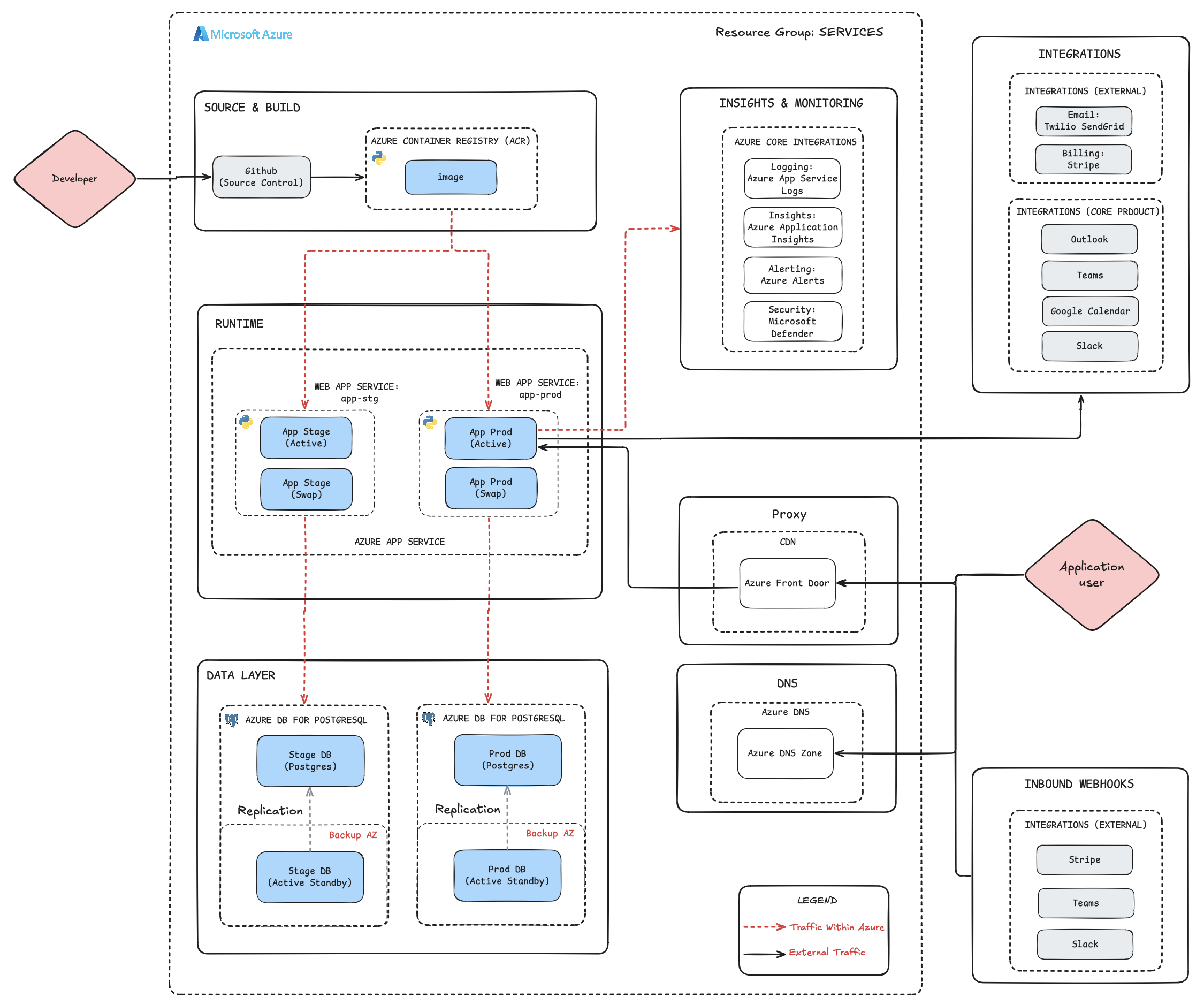
- All APIs and services run as containers on Azure App Service
- Databases run on Azure Database for PostgreSQL
- Static sites are served via Azure Static Web Apps and Blob Storage
- DNS is centralized in Azure DNS Zones
- Monitoring, logs, and security are consolidated under Azure Monitor and Application Insights
- Deployment slots enable zero-downtime swaps
- Azure Front Door provides a CDN coverage
- Environment configuration is standardized across services
The typical architecture for our services is as follows (with some minor variations across our services):
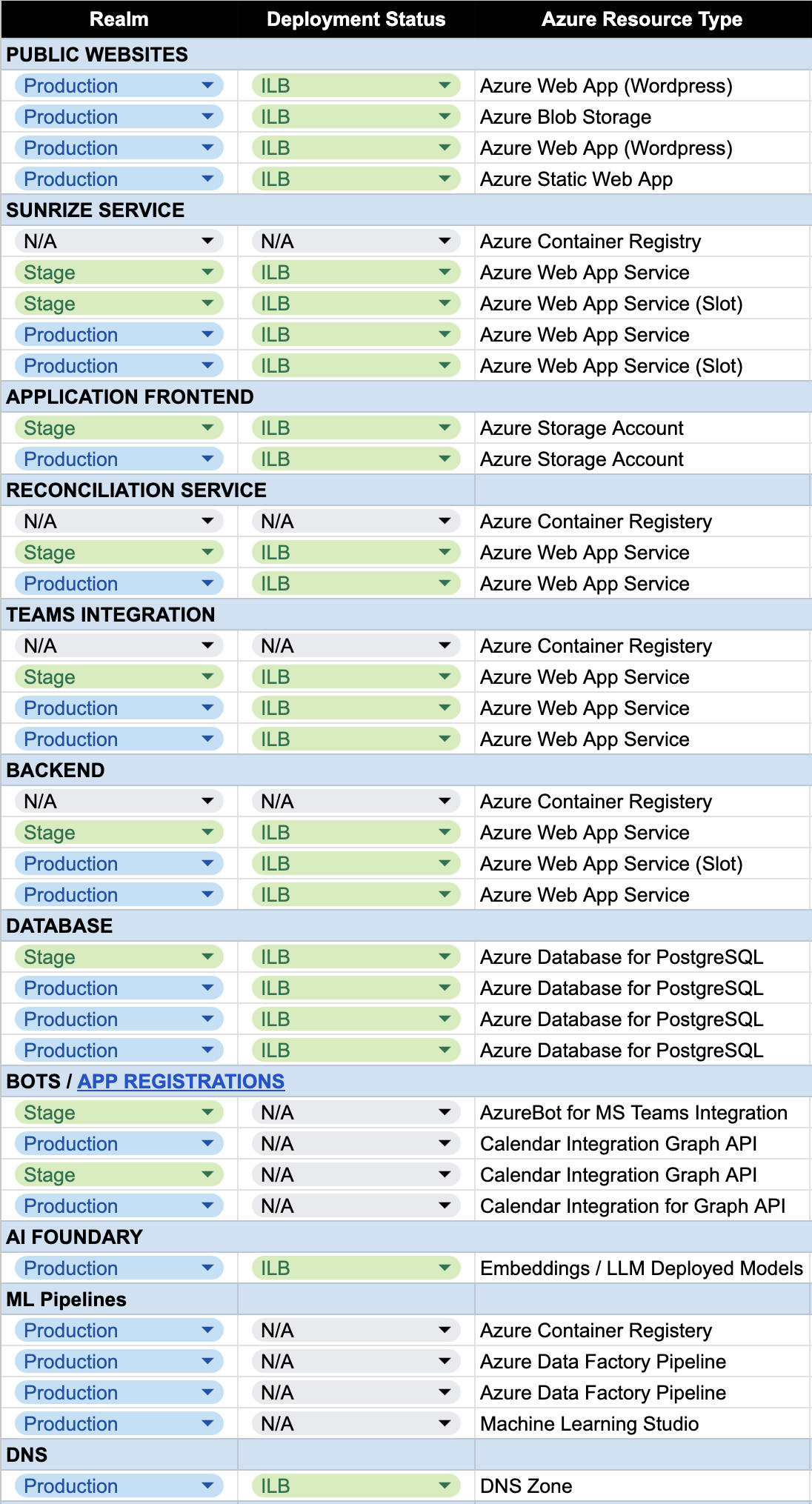
We are already heavy users of Azure, with many services now running in the ecosystem. We plan to continue embedding deeper over time as our platform expands, and are currently very focused on Machine Learning pipelines and AI services:
Downtime or Service Degradation Was Non-Negotiable
Several aspects of this migration required careful coordination:
- Database migration without losing writes
- Background scheduler cutover without duplicate job execution
- DNS changes without traffic interruption
- Container redeployments without request drops
We’ll unpack the exact mechanisms in later chapters, including:
- Write-audit strategies for safe database migration
- Feature flags for safe scheduler cutover
- Deployment slot swap patterns
- Region alignment and networking considerations
- Handling outbound NAT throughput constraints
The migration was completed without customer-visible disruption.
Before and After: Cloud Infrastructure Mapping
At a high level, these are the Azure equivalents we chose for each of our AWS services. Note that they are not always functionally equivalent, but we’ll discuss the motivations for each choice within their dedicated chapters.
| AWS | Azure |
|---|---|
| EC2 | Azure App Service |
| ECS | Azure App Service (Containers) |
| ECS Task Definitions | Azure Container Registry |
| LightSail | Azure App Service |
| RDS (Postgres) | Azure Database for PostgreSQL |
| S3 (static sites & assets) | Azure Blob Storage + CDN |
| CloudFront (CDN) | Azure CDN |
| Route53 (DNS) | Azure DNS Zones |
| S3 (files) | Azure Blob Storage |
What This Series Covers
This migration wasn’t a single event, but done in phases (the ordering of which impacts the process). We’ll cover the following aspects of it in the following chapters:
Part I — Strategic Migration
- Guide summary and business context (you are here!)
Part II — Container Migration
Part III — Database Migration
Part IV — Network & Infrastructure
Part V — Machine Learning
Each chapter focuses on implementation details, tradeoffs, and real-world lessons.
Lessons at a Glance
A few high-level takeaways covered in the next chapters:
- Region selection in Azure early on matters (not all resources are available in all regions)
- NAT Throughput limits need to be tested thoroughly, to understand their impact on performance
- The order in which migrations occur is a relevant factor, particlarly when it comes to DNS (in which Apex records require static IP addresses)
- Deployment slots make rollbacks instantaneous, and provide a valid environment to test with a production setup
- Standardization across different service types (eg. wordpress vs applcation sevices) heavily reduces operational overhead
- Migrations of bespoke configurations (like Bitnami flavored WordPress on Lightsail) are not trivial, but standard configurations pay off in the long run
Each of these deserves its own explanation — and will get one
Enjoying this migration guide?
Get notified when new chapters are published. No spam, unsubscribe anytime.